System Architecture
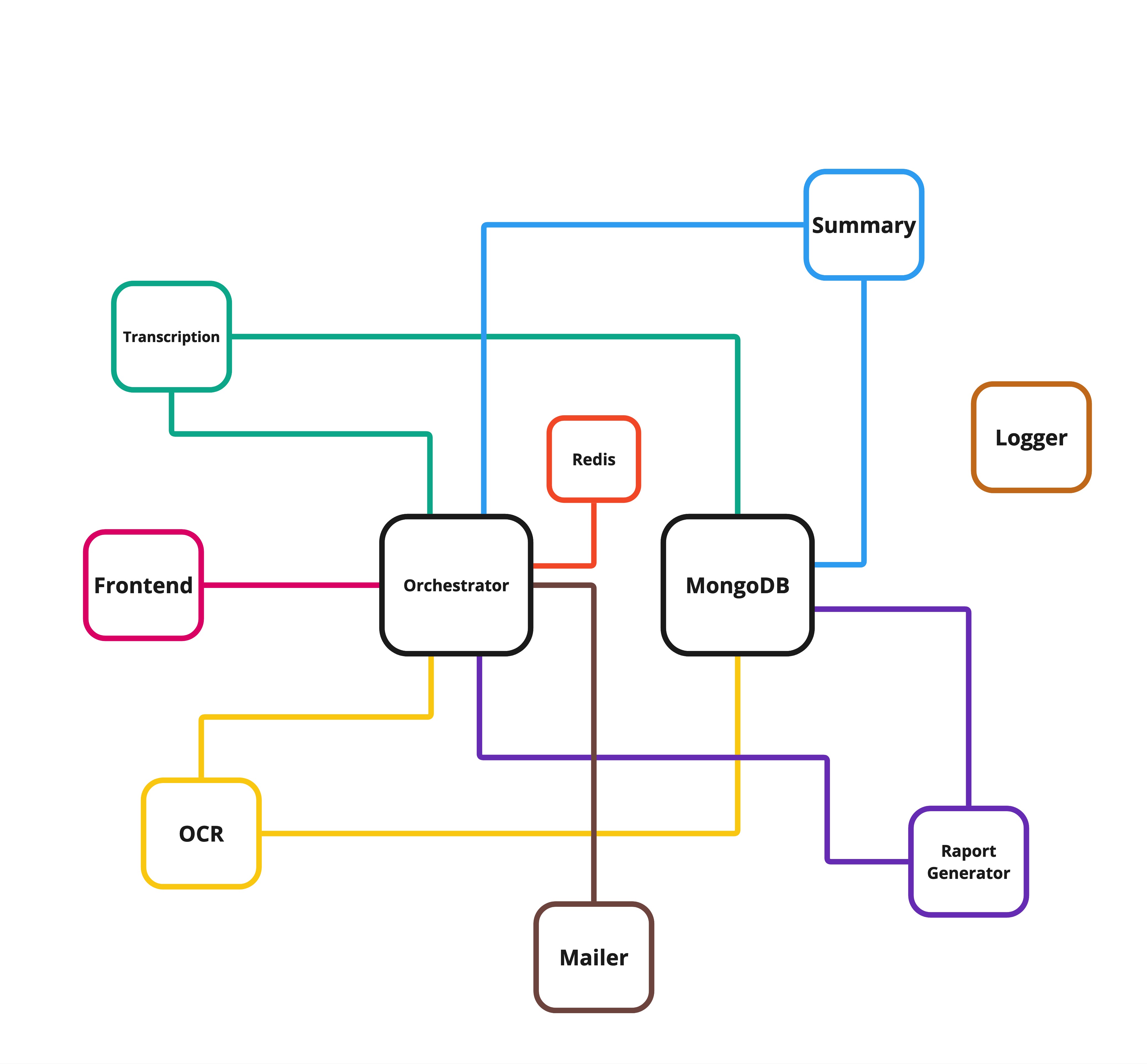
The Meeting Report Generator employs a microservices-based architecture designed to ensure scalability, flexibility, and maintainability. Each service is specialized to handle a specific task, making the system modular and efficient.
Architecture Overview
-
Frontend:
A web interface that interacts with users, captures audio fragments for transcription, and uploads screenshots for OCR processing. -
Backend:
Composed of multiple microservices written in Go and Python, responsible for handling tasks, transcription, summarization, OCR, PDF generation, logging and sending emails. -
Database (MongoDB):
Stores meeting transcriptions, embeddings, summaries, and OCR results for further analysis and reporting. -
Redis:
Acts as a temporary data store, maintaining the status of tasks and data about meeting.
Architecture Diagram
Below is a visual representation of the system’s architecture, highlighting the interactions between various components:
Data Flow
The data flow in the system involves several coordinated steps to process user input, handle tasks across microservices, and generate a comprehensive meeting report. Below is a detailed step-by-step description:
1. Meeting Initialization
- The user starts the application and provides their email.
- The Orchestrator generates a
meeting_idand:- Stores the user email in Redis under the key
meeting:meeting_id:email. - Sets the initial meeting status to
startedin Redis with the keymeeting:meeting_id:status.
- Stores the user email in Redis under the key
2. Capturing Inputs
- Audio: The frontend captures audio in 5-minute fragments and sends them to the backend.
- Screenshots: The frontend detects changes on the user’s screen and sends screenshots for OCR analysis.
3. Processing Audio
- The Orchestrator receives audio files and:
- Saves them to the shared volume
shared-transcription. - Adds a task to Redis under
meeting:meeting_id:taskswith statuspending. - Sends the task to the Transcription Service via RabbitMQ on the
transcription_queue.
- Saves them to the shared volume
- The Transcription Service:
- Processes the audio, identifying speakers and transcribing the content.
- Saves the transcription in MongoDB in the
transcriptionscollection. - Updates or creates speaker embeddings in the
embeddingscollection for consistent speaker identification. - Sends an acknowledgment to the Orchestrator on the
orchestrator_ack_queue.
4. Processing Screenshots (OCR)
- The Orchestrator receives screenshots and:
- Saves them to the shared volume
shared-ocr. - Adds a task to Redis under
meeting:meeting_id:taskswith statuspending. - Sends the task to the OCR Service via RabbitMQ on the
ocr_queue.
- Saves them to the shared volume
- The OCR Service:
- Processes the images using OCR models (e.g., OpenAI) to extract text.
- Saves the OCR results in MongoDB in the
ocr_resultscollection. - Sends an acknowledgment to the Orchestrator on the
orchestrator_ack_queue.
5. Managing Tasks and Statuses
- The Orchestrator listens for acknowledgments from all services.
- It updates the task statuses in Redis to
completed. - When the frontend indicates the meeting is complete (
meeting:meeting_id:statusset toended) and all transcriptions are finished, the Orchestrator sends a task to the Summary Service on thesummary_queue.
6. Generating Summaries
- The Summary Service:
- Fetches transcriptions from MongoDB.
- Uses a language model (e.g., LLaMA or GPT) to generate a concise summary.
- Saves the summary in MongoDB in the
summariescollection. - Sends an acknowledgment to the Orchestrator on the
orchestrator_ack_queue.
7. Generating Reports
- After receiving the acknowledgment from the Summary Service and ensuring all OCR tasks are completed, the Orchestrator sends a task to the Report Service on the
report_queue. - The Report Service:
- Fetches all transcriptions, summaries, and OCR results from MongoDB.
- Retrieves screenshots from the
shared-ocrvolume. - Generates a PDF report and saves it to the
shared-reportvolume. - Sends an acknowledgment to the Orchestrator.
8. Sending the Report
- The Orchestrator retrieves the user’s email from Redis (
meeting:meeting_id:email) and sends a task to the Mailer Service on theemail_queue. - The Mailer Service:
- Fetches the PDF report from the
shared-reportvolume. - Sends the report to the user via email.
- Sends an acknowledgment to the Orchestrator.
- Fetches the PDF report from the
9. Cleaning Up
- After receiving the acknowledgment from the Mailer Service, the Orchestrator:
- Deletes all data related to the
meeting_idfrom:- Shared volumes (
shared-transcription,shared-ocr,shared-report). - MongoDB (transcriptions, summaries, OCR results, embeddings).
- Redis (meeting metadata and tasks).
- Shared volumes (
- Deletes all data related to the
Key Benefits of the Architecture
- Scalability: Independent microservices can be scaled as needed based on workload.
- Flexibility: Services are modular, allowing for easy updates or replacements.
- Reliability: Temporary data storage in Redis ensures that task states are maintained, even in the event of service interruptions.
- Extensibility: Additional services, such as analytics or advanced natural language processing, can be integrated without disrupting the existing workflow.
For a detailed explanation of each microservice, refer to the Microservices Overview.